Loading AI BlurWeb
Try AI BlurWeb on this Page
this try section does not include all the feature, but it gives you idea of how blurweb can work for you
Blur any element
You can blur any element on a page, such as an input, a link, an email address, an image, etc.
Test Inputs, Links & Image
Why install the full extension?
While this interactive sandbox allows you to experience the basic elements of auto-blurring, the full Chrome Extension offers advanced real-time security features that work across any tab, window, or domain.
🔒 100% Client-Side Privacy
No external APIs or databases are queried with your browser's visible text. The neural rules and local regex scanning structures exist entirely within your browser runtime, which means your credentials and passwords never leave your device.
⚡ Intelligent Auto-Blur
As pages render, our algorithms target specific DOM selectors representing financial accounts, social security numbers, private emails, and telephone figures. They apply immediate obfuscation filters before they are rendered on screen.
⚙️ Customizable Custom Rules
Create specific rules for domains you visit frequently. Target your billing console to cover customer identification strings, or setup CSS overrides that persist across page loads and system reboots.
🎥 Stream & Share Safely
Perfect for Zoom calls, Google Meet sessions, or recording screen tutorials. Never worry about accidentally exposing active database keys, user records, or internal company passwords again.
🎯 Interactive Sandbox
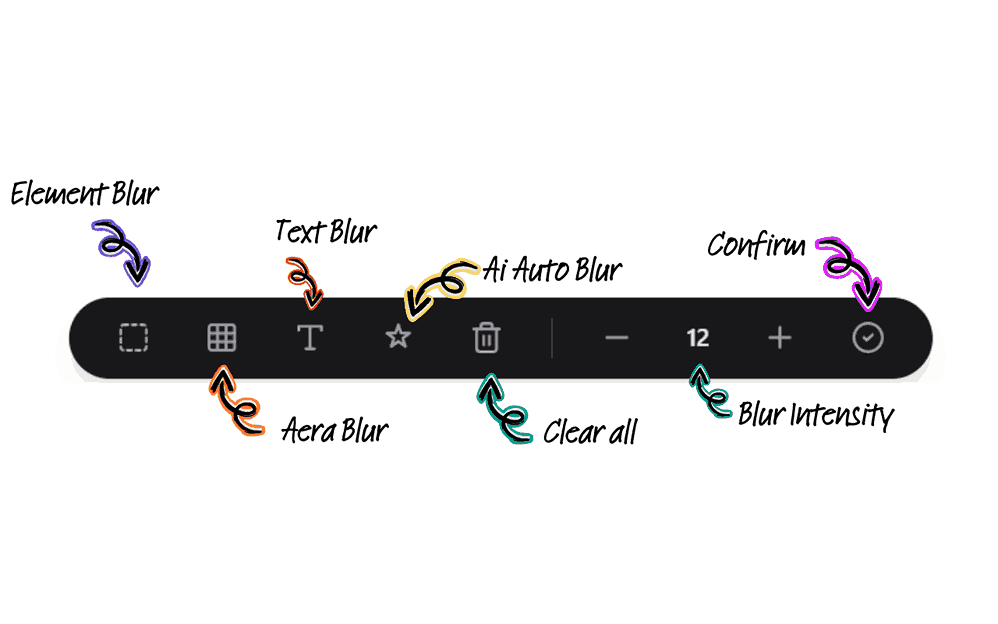
Hover over elements on this page to see the outline, then click to blur/unblur. You can also adjust intensity or try AI Auto Blur in the toolbar below.
AI BlurWeb Demo