The Ultimate Guide to Screen Privacy: Protect Your On-Screen Data
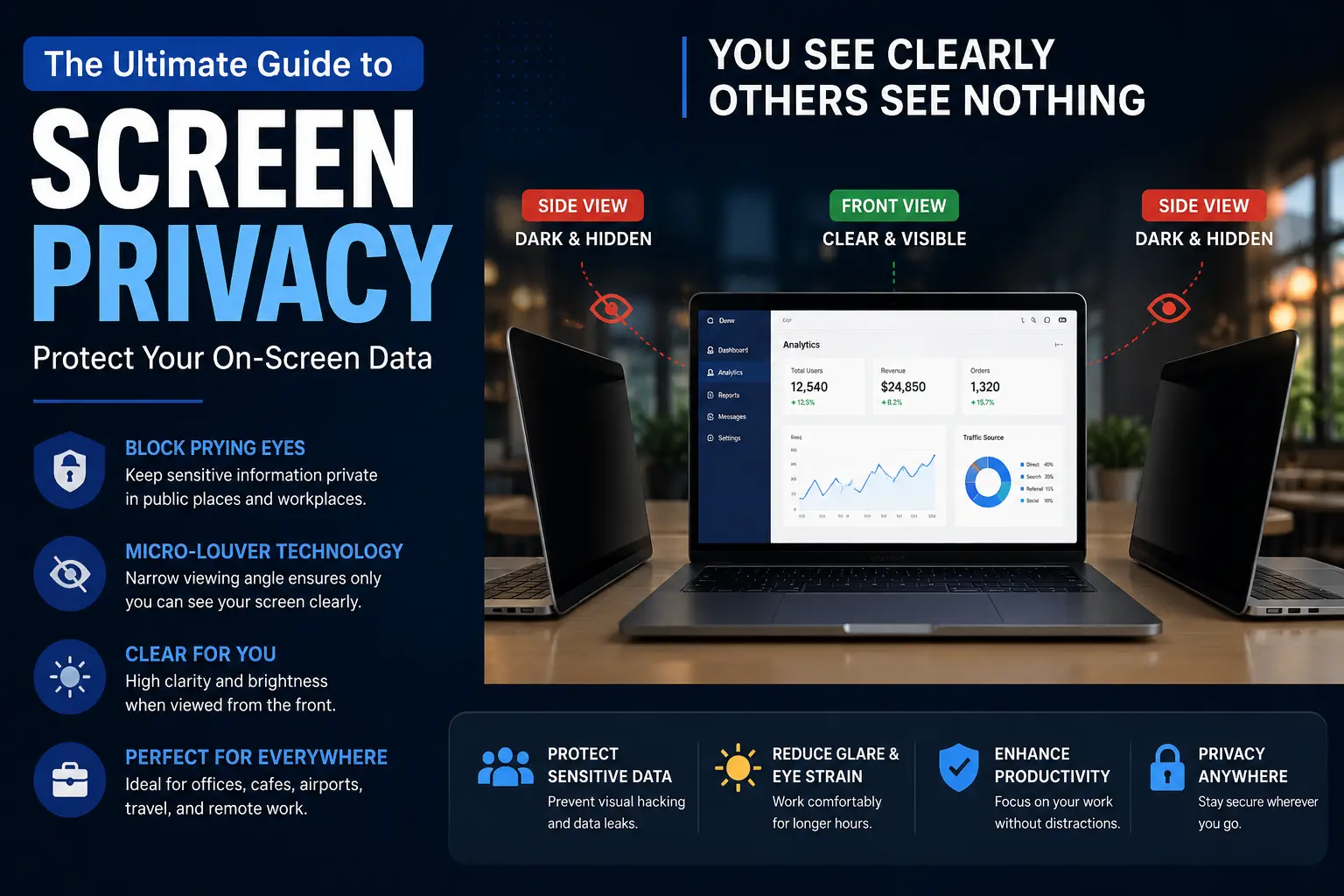
You have probably opened your laptop at a crowded café, airport terminal, or shared co-working space without realizing who could glance over your shoulder. A single quick look from a nearby onlooker can expose customer databases, confidential emails, banking credentials, or API keys in milliseconds. In this comprehensive guide, you will learn what screen privacy entails, how micro-louver technology shields your monitor, and how to combine physical privacy filters with real-time screen data masking for end-to-end data security.
Key Takeaways
- •Privacy Screen Filters Narrow Viewing Angles: Thin optical layers placed over displays restrict visibility to a straight-on 30° to 60° cone, preventing side-angle visual eavesdropping.
- •Micro-Louver Technology Blocks Light Scatter: Microscopic vertical louvers act like miniature window blinds, transmitting light directly forward while absorbing or reflecting side light.
- •Visual Hacking Has a 91% Success Rate: Empirical benchmark studies by the Ponemon Institute reveal that unprotected screens allow unauthorized onlookers to harvest sensitive credentials in over 9 out of 10 attempts.
- •Material Choices Dictate Durability: PET plastic films provide lightweight budget protection, while tempered glass filters deliver superior optical clarity, scratch resistance, and impact protection.
- •Physical Filters Do Not Protect Video Calls: A physical filter hides your screen from people in the room, but screen-sharing on Zoom, Teams, or Loom requires AI BlurWeb browser masking to blur credentials in real time.
What Is a Computer Privacy Screen Filter and How Does It Work?
A computer privacy screen filter is an optical overlay engineered to drastically narrow the horizontal viewing angle of a digital display. When viewed directly from the front, the display appears crisp and legible, but when viewed from an angle exceeding 30 degrees, the screen appears completely black or heavily blurred.
This selective light restriction is achieved through micro-louver technology. Micro-louvers are thousands of microscopic, precision-angled vertical slats embedded within the optical polymer of the filter. Light emitted by the screen’s backlight travels straight through the gaps between the slats toward the intended user. However, light directed sideways hits the opaque walls of the micro-louvers and is absorbed, preventing onlookers sitting adjacent to you from reading the displayed data.
Modern computer privacy filters also integrate anti-reflective matte coatings to eliminate harsh environmental glare and blue-light filtration layers to diminish eye strain during prolonged working sessions. Premium optical solutions from manufacturers like 3M retain up to 85% of front-facing screen luminance, ensuring users do not need to compromise display clarity for security.
How Micro-Louvers Control Light Transmission
Light beams pass straight through the vertical micro-louver channels directly into the user's eyes with 85%+ optical clarity.
Micro-louver walls begin absorbing side light, causing screen contents to dim sharply and fonts to become unreadable.
100% of sideways light is absorbed or polarized, rendering the entire display totally black or opaque to nearby onlookers.
Microlouver vs. Polarized Privacy Layers
While larger laptop and desktop monitors rely predominantly on microscopic physical louvers, mobile privacy screen protectors frequently use dual polarized optical films. Polarized filters align light waves in a single orientation. When a smartphone is tilted in portrait orientation, the polarizing filter blocks oscillating light rays from reaching side angles, producing a privacy cutoff without adding noticeable physical thickness.
Why Is Screen Privacy Essential for Preventing Data Breaches?
Visual hacking—the act of capturing confidential data by looking at an exposed screen—is one of the most effective yet overlooked vectors of organizational data loss. Unlike network intrusions or malware, shoulder-surfing requires zero specialized software and leaves no digital audit logs.
Visual Hacking Success Rate
In benchmark trials conducted by the Ponemon Institute, undercover security testers successfully obtained confidential information in 91% of visual hacking attempts.
Enterprise Security Risk
82% of enterprise IT security leaders classify visual eavesdropping in hybrid workplaces as a primary vulnerability for confidential credential theft.
Consider a typical scenario: an executive reviewing quarterly financials on a flight or a software engineer opening cloud infrastructure keys in a coffee shop. A nearby observer with good eyesight or a high-resolution smartphone camera can record login credentials, customer Personally Identifiable Information (PII), or private Slack discussions in seconds.
Furthermore, strict data protection standards such as the European Union’s General Data Protection Regulation (GDPR) and the United States’ Health Insurance Portability and Accountability Act (HIPAA) require organizations to safeguard protected health information (PHI) and client records from unauthorized visual exposure. Installing physical privacy filters on nursing station monitors and financial workstations is a recognized physical compliance control.
Founder's Insight: The Dual-Layer Privacy Rule
As the developer of AI BlurWeb, I test both hardware screen filters and software privacy daily. A physical privacy filter stops someone sitting next to you at a cafe, but it cannot protect your data when you share your screen on Zoom, Google Meet, or create a screen recording on your laptop. True data protection requires a dual-layer approach: physical filters for the physical room, and automated browser blurring for the digital stream.
What Types of Screen Privacy Solutions Are Available?
Modern screen privacy tools are categorized into attachable external filters and built-in electronic displays:
1. External Laptop and Desktop Monitor Privacy Filters
Available in magnetic snap-on, hang-and-clip, and adhesive strip formats. Magnetic versions attach to laptop bezels instantly, allowing software developers and designers to remove the filter when presenting to a teammate. Adhesive films adhere firmly to bezel channels, offering permanent protection for clinical or financial workstations.
2. Smartphone and Tablet Privacy Screen Protectors
Mobile protectors combine 9H hardness tempered glass with 2-way (horizontal) or 4-way (horizontal and vertical) polarized privacy matrices. They protect displays from impact and shatter damage while keeping banking apps, text messages, and one-time verification codes invisible to adjacent commuters on public transit.
3. Tempered Glass vs. PET Plastic Films
PET (Polyethylene Terephthalate) films are ultra-thin (0.15mm), lightweight, and budget-friendly ($5–$20), but can develop fine hairline scratches over time. Tempered glass protectors (0.33mm–0.5mm) cost slightly more ($20–$40 for phones, $40–$70 for laptops) but offer unmatched scratch resistance, glass-smooth touch sensitivity, and superior optical clarity.
4. Built-In Electronic Privacy Displays (HP Sure View, Dell SafeScreen, Lenovo Privacy Guard)
High-end enterprise laptops incorporate electronic privacy technology directly into the display panel. By pressing a dedicated function key (e.g., F2 on select HP EliteBooks), the liquid crystal backlight alters light divergence electronically, instantly narrowing the viewing angle without carrying separate physical accessories.
How to Choose the Best Privacy Screen Filter for Your Device
Selecting the ideal privacy filter requires matching your exact hardware specifications and everyday usage environment:
Measure your monitor diagonally and verify width/height dimensions. A 15.6-inch 16:9 filter will not fit a 15.6-inch 16:10 laptop screen.
Opt for a 30° viewing cone for high-risk public environments (airports, trains) or 60° for shared conference rooms where moderate collaborative viewing is helpful.
Choose magnetic snap-on filters if you frequently alternate between private solo work and group collaboration, or adhesive slide-mounts for permanent privacy.
If you work under fluorescent office lights or outdoors, select a dual-finish filter with a matte anti-glare side to eliminate reflections.
Ensure the product specifications explicitly certify multi-touch capacitance if using 2-in-1 convertibles, iPads, or Surface Pro styluses.
Verify that the filter guarantees at least 70% to 85% front-view light transmission to minimize battery drain from increased backlight settings.
How to Install and Maintain a Privacy Screen Filter
Proper installation ensures bubble-free optical clarity and maximum micro-louver privacy performance:
- Clean the Screen: Wipe your screen thoroughly with an isopropyl alcohol wipe or microfiber cloth. Remove all grease, fingerprints, and dust particles to avoid trapping debris beneath the filter.
- Align the Guide Tabs: Place the filter against the display to verify horizontal and vertical alignment before removing any protective adhesive liners.
- Attach Securely: For adhesive filters, start from the top edge and use a squeegee wrapped in microfiber cloth to press smoothly downward, displacing air pockets toward the bezel edges.
- Verify Viewing Angles: Position yourself directly in front of the screen to confirm crisp readability, then step 30° to the side to verify that the display turns opaque black.
Maintenance and Cleaning Best Practices
Clean your privacy filter using a dry microfiber cloth or screen-safe cleaner free of ammonia. Avoid abrasive paper towels that could scratch the micro-louvers. If using a removable magnetic filter, store it in its protective sleeve whenever it is removed to prevent bending and dust accumulation.
Do Privacy Screens Affect Screen Brightness or Usability?
Because privacy filters function by physically blocking oblique light rays, they inherently reduce overall display luminance by 30% to 50%. You can easily compensate by increasing your screen brightness by one or two notches. Premium micro-louver designs (such as 3M Bright Screen) optimize light collimation, preserving vibrant colors and high brightness for the primary user.
Additionally, while matte anti-glare finishes produce a subtle velvet texture on glossy OLED displays, most professionals find this trade-off worthwhile for the immense eye-comfort benefits and data security gained.
How Much Do Privacy Screen Filters Cost, and Are They Worth It?
Privacy screen filters are an inexpensive, high-return investment for personal and business data security. Here is an overview of standard market price tiers:
| Filter Type / Tier | Price Range (USD) | Primary Use Case |
|---|---|---|
| PET Film Filter (Standard) | $5 – $15 | Budget smartphones and secondary tablets |
| Tempered Glass Smartphone Privacy | $20 – $35 | Daily mobile banking and confidential texting |
| Laptop Privacy Filter (13" – 16") | $35 – $60 | Hybrid commuters and remote professionals |
| Large Desktop Monitor Filter (24" – 32") | $50 – $90 | Office workstations, medical reception, finance |
| Magnetic / Quick-Flip Enterprise Solutions | $70 – $120 | Corporate fleets and frequent presenters |
Source: Industry Hardware Retail Benchmarks & Market Analysis, 2026.
Are they worth it? A single compromised corporate login or regulatory HIPAA violation can cost an enterprise tens of thousands of dollars in remediation. A one-time $30 to $70 hardware filter is a trivial expenditure compared to the immense financial and reputational protection it delivers.
Complete Privacy Stack: Hardware Filters + AI BlurWeb
While a physical screen filter protects your display from in-person shoulder surfers, it cannot prevent participants in a Zoom meeting, Microsoft Teams call, or Google Meet presentation from seeing your unmasked passwords and customer data.
Pair your hardware filter with AI BlurWeb. AI BlurWeb operates 100% locally in your browser using WebGL/WASM machine learning to detect and blur passwords, credit cards, API keys, and sensitive inputs automatically in real time with zero server uploads. Check out our affordable lifetime plans or test the free interactive sandbox.
Next Steps: How to Safeguard Your Screens Today
Take these actionable steps to secure your screen privacy across all devices:
Audit Your Exposure Environments
Identify every location where you work publicly (airports, cafes, co-working spaces, trains) and list the sensitive applications you frequently open.
Equip Hardware Filters on Portable Devices
Order a precision-fitted 30° privacy filter for your primary work laptop and a tempered glass privacy protector for your smartphone.
Adopt Defensive Physical Computing Habits
Position your back to walls when working in public, lower your screen brightness slightly in dim rooms, and lock your screen (Win+L / Cmd+Ctrl+Q) every time you step away.
Install AI Browser Masking for Digital Calls
Activate AI BlurWeb to automatically conceal credentials and client data during live meetings and video recordings.
Enforce Organizational Security Policies
Standardize clean-desk guidelines and visual security protocols across your distributed team to maintain compliance with GDPR and HIPAA.
Conclusion
Screen privacy is a foundational yet frequently underestimated pillar of cybersecurity. While firewalls and multi-factor authentication secure your digital infrastructure, physical privacy screen filters and real-time browser blurring ensure that unauthorized onlookers cannot capture confidential data straight from your display.
By equipping your laptop with a micro-louver privacy filter and incorporating real-time AI masking for screen shares, you eliminate both physical shoulder-surfing and digital video leaks simultaneously.
Measure your device screen, pick the right filter rating, and start protecting your on-screen data today. For more insights on digital masking and media editing, explore our guides on screen data protection, recording screens securely, and photo blur techniques.

Written & Reviewed by Deepak (Founder)
Founder & Solo Developer at AIBlurWeb
Deepak builds privacy-focused browser tools and writes about screen privacy, browser security, sensitive-data protection, screen sharing, and AI-powered privacy tools. Read more about the founder →
Disclaimer: This article was initially drafted with AI research assistance and thoroughly revised, fact-checked, and validated by human editors and security subject matter experts.